Strikethrough Text Generator
This strikethrough text generator is a free tool that crosses out your text with Unicode: it adds the character U+0336 after each letter, digit and punctuation mark, so the line survives copy and paste. Spaces and emoji stay clean, and pasting struck text back in removes the line.
All strikethrough text styles
Top picks
Letter styles
App syntax
We tested this page on 30 October 2026 in Playwright's Chromium 151, WebKit 26.5 (Safari's engine) and Firefox 153 on macOS 26.6, never inside an app, because we cannot log in.
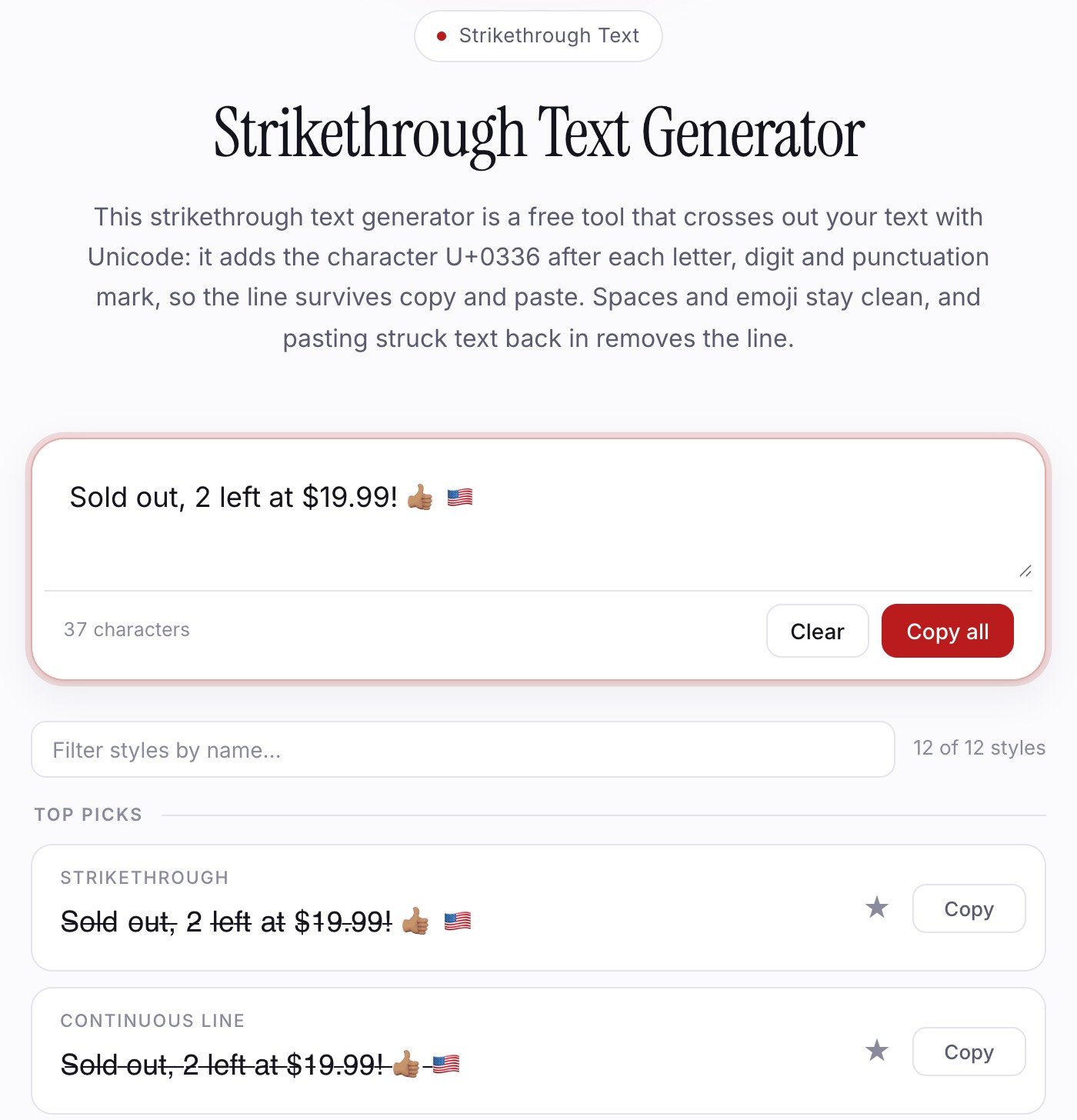
This generator in Chromium 151, 30 October 2026, from a local build. The sticky site header is hidden.
Why use our strikethrough text generator?
Whole characters
Flags, skin tones and accents stay in one piece.
It undoes itself
Paste struck text in; one style removes the line.
App syntax included
Discord, WhatsApp and HTML versions too.
Stays in your browser
Your text is not sent to a server.
How to use it
- Type or paste your text into the input box at the top.
- Read the output of each style as you type.
- Press Copy on the one you want.
- Paste it. If the line is missing or shows boxes, use the app's own formatting.
What happens to words, spaces, digits and emoji?
Every character gets the stroke except whitespace and emoji. All 12 styles gave the expected output in all three engines, and Copy then paste changed nothing.
| You type | What comes out |
|---|---|
| Words, digits, punctuation | Stroke on each, including $ . , ! ? |
| Spaces, tabs, line breaks | Clean, so lines wrap normally |
| Flags, skin tones, keycaps | Whole, with no stroke |
| é, typed either way | Accent kept, one stroke |
| Text already struck | Not doubled |
How does strikethrough text work?
Strikethrough text works by placing a combining character after each letter, and the font draws that mark across the letter. The main one is U+0336, which Unicode's character database names COMBINING LONG STROKE OVERLAY. So Cancel becomes 12 characters, not 6. Short Strike uses U+0335, Slashed U+0338 and Tilde Overlay U+0334.
Emoji are the trap: a flag is two code points, so a mark after each breaks it apart. We now leave emoji alone, because even a mark after the whole emoji drew a short, off-centre dash in all three engines.
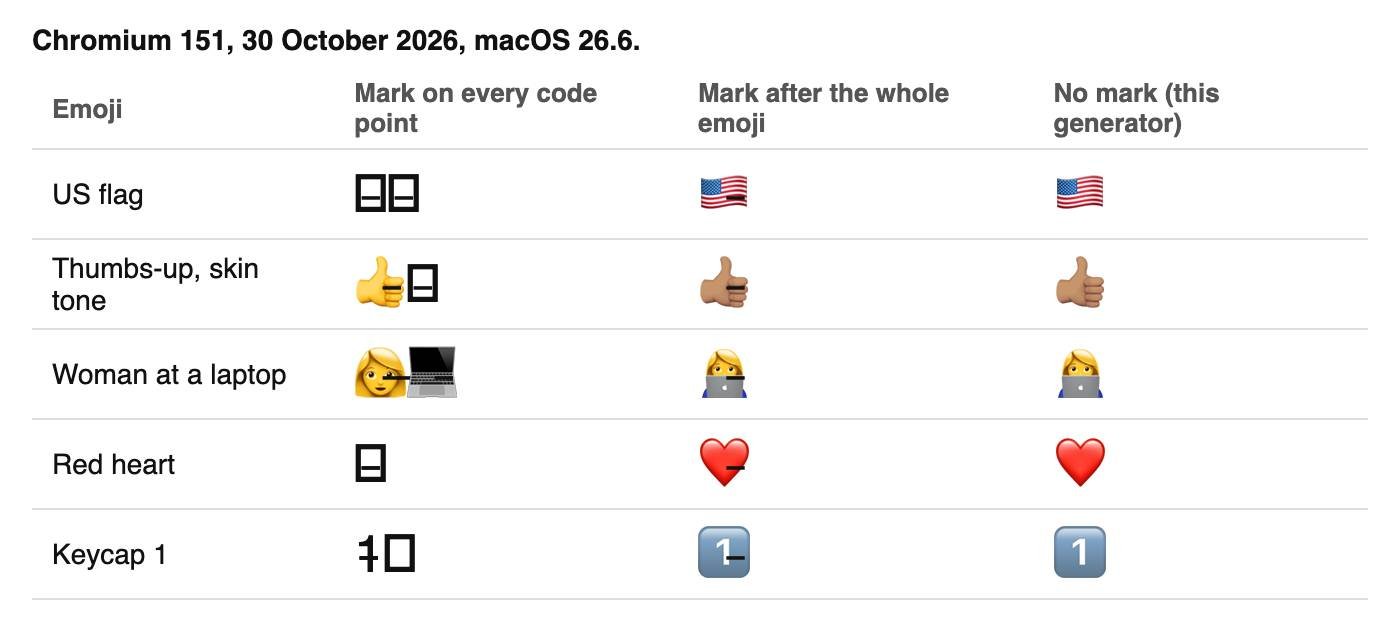
Our test page in Chromium 151, 30 October 2026.
Stroked spaces left a stray dash at the start of each wrapped line in all three engines, and stroked no-break spaces never wrapped. So Strikethrough keeps spaces clean; save Continuous Line for one short line.
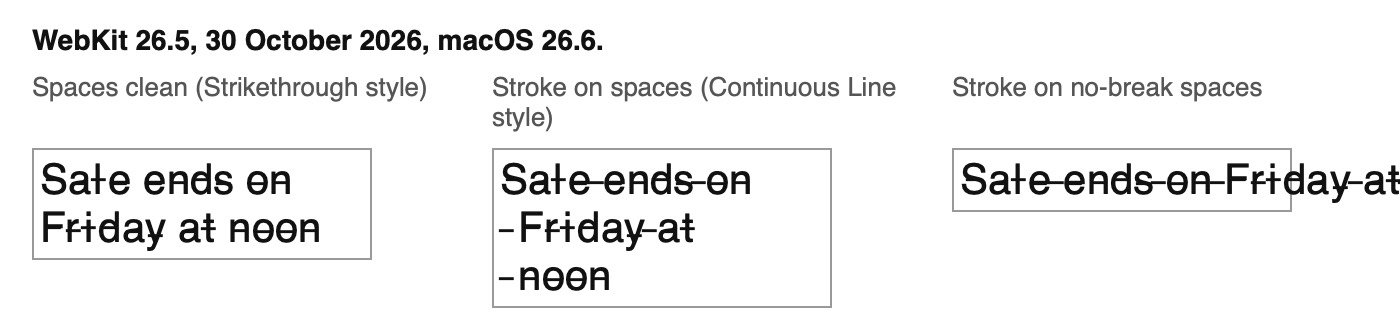
Our wrapping test in WebKit 26.5, 30 October 2026.
How do I cross out text?
To cross out text, type it into the box above and copy the Strikethrough style, or use the app's own formatting where it has any. We read these help pages on 30 October 2026 but could not log in to try them.
| Where | Do this | Source |
|---|---|---|
| Discord messages | ~~text~~ | Discord |
~~text~~ | ||
| GitHub | ~~text~~ or ~text~ | GFM spec, and our test of GitHub's renderer |
~text~ | ||
| Slack | ~text~ | Slack |
| Google Docs | Alt + Shift + 5 (Windows), ⌘ + Shift + x (Mac) | |
| Microsoft Word | Home > Strikethrough | Microsoft |
| Web pages | <s>text</s> | HTML standard |
Where does copied strikethrough text work?
Copied strikethrough text works wherever plain Unicode is accepted and the font can draw it, because the stroke is a character, not formatting:
| Paste target | Unicode stroke | Status |
|---|---|---|
| Plain text box | Kept | Tested, 3 engines |
| Rich text editor on a web page | Kept | Tested, 3 engines |
| Field limited to 32 characters | Only 16 struck letters fit | Tested, 3 engines |
| GitHub Markdown | Kept | Tested |
| X (Twitter) | Each struck letter counts as 2 | From X's weights, not posted |
| Discord names | Limit is 32, so perhaps 16 letters | Not tested; try the Discord font generator |
| Instagram, Facebook, WhatsApp, Slack | Unknown | Not tested |
We tested no Windows, Android or iPhone devices, so check a draft on your phone before posting to social media.
What is the difference between Unicode strikethrough and built-in formatting?
Unicode strikethrough changes the text itself, while built-in formatting changes how an app displays unchanged text.
| Unicode | Built-in (~~, Docs, Word, HTML) | |
|---|---|---|
| Pasted into a plain text box | Line kept | Line lost (tested with an HTML s tag) |
| How the line looks | Depends on the reader's font | Drawn by the app |
| Meaning to assistive software | None | HTML s and del are exposed as deletions in Chromium |
Why does the line look broken in some fonts?
The line looks broken because each stroke is a separate short mark supplied by the font, and not every font has one. On macOS 26.6, Core Text finds U+0336 in Helvetica, Arial, Times New Roman, Courier New and Menlo, but not in Georgia, Verdana, Trebuchet MS, Comic Sans MS or San Francisco.
| Engine | Font without U+0336 | The stroke |
|---|---|---|
| Chromium 151, Chrome 156 | Empty boxes in Georgia, Comic Sans MS and plain serif | Overhangs at word ends |
| WebKit 26.5 | No boxes, but letters change font | Separate dashes: l looks like a plus sign, $19.99 like $19_99 |
| Firefox 153 | No boxes, and the font's letters stay | Closest to a solid line |
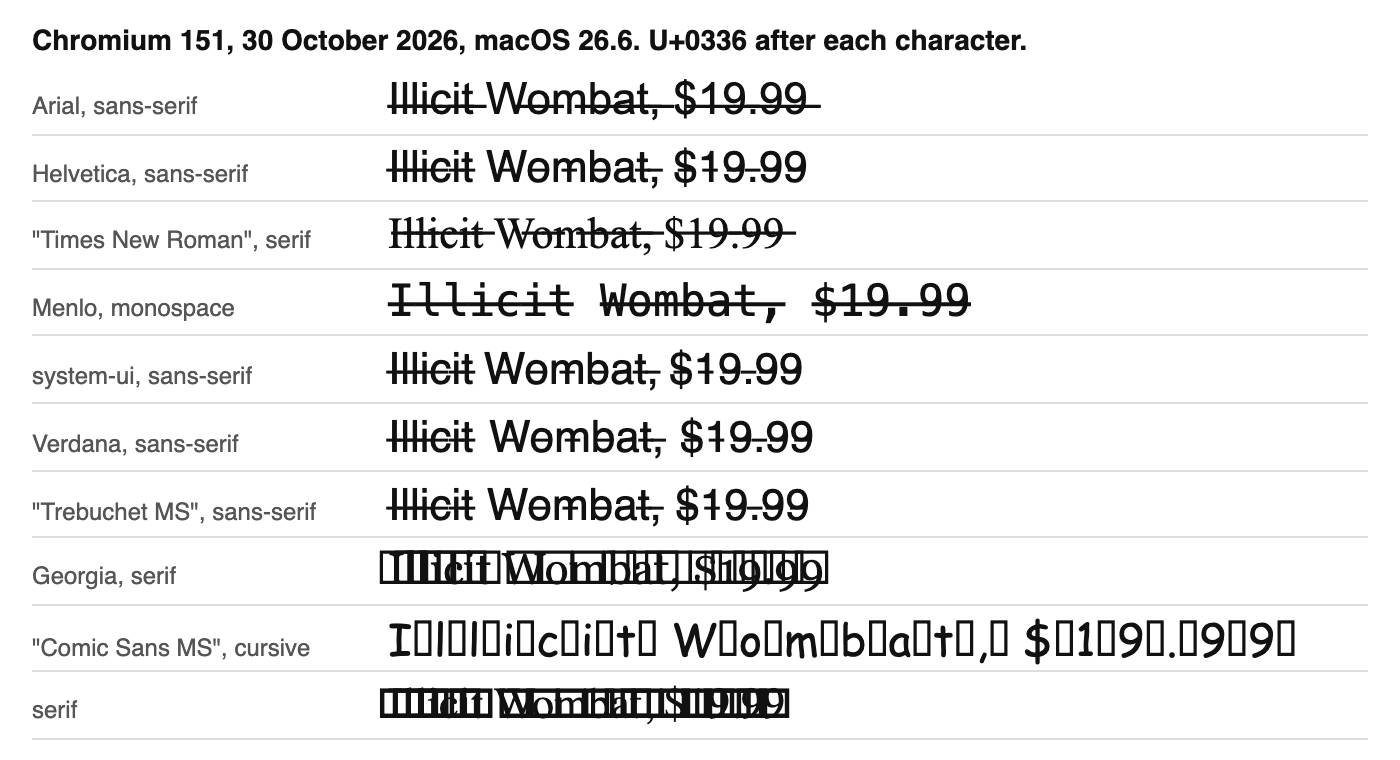
Chromium 151, our test page, 30 October 2026. Chrome 156 drew the same boxes.
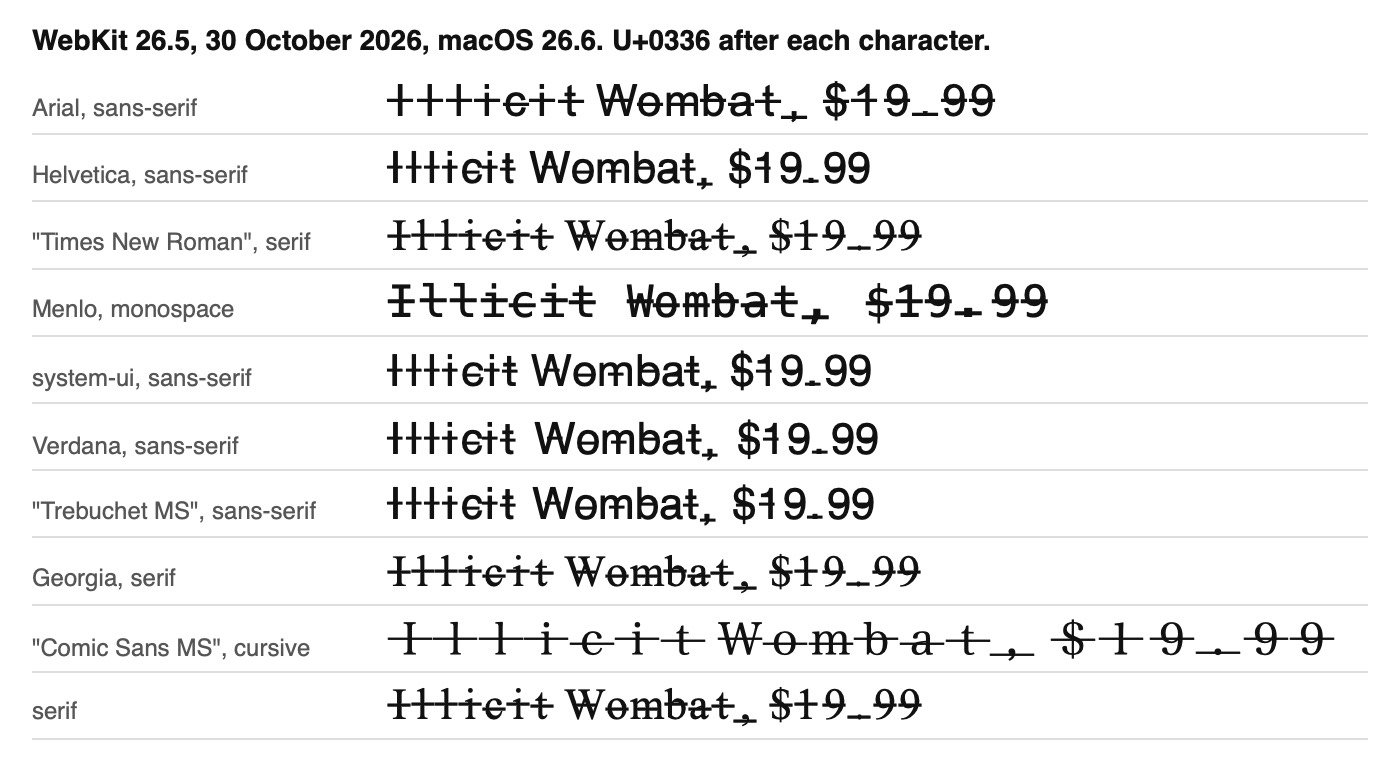
WebKit 26.5, 30 October 2026. Safari's engine, not Safari itself.
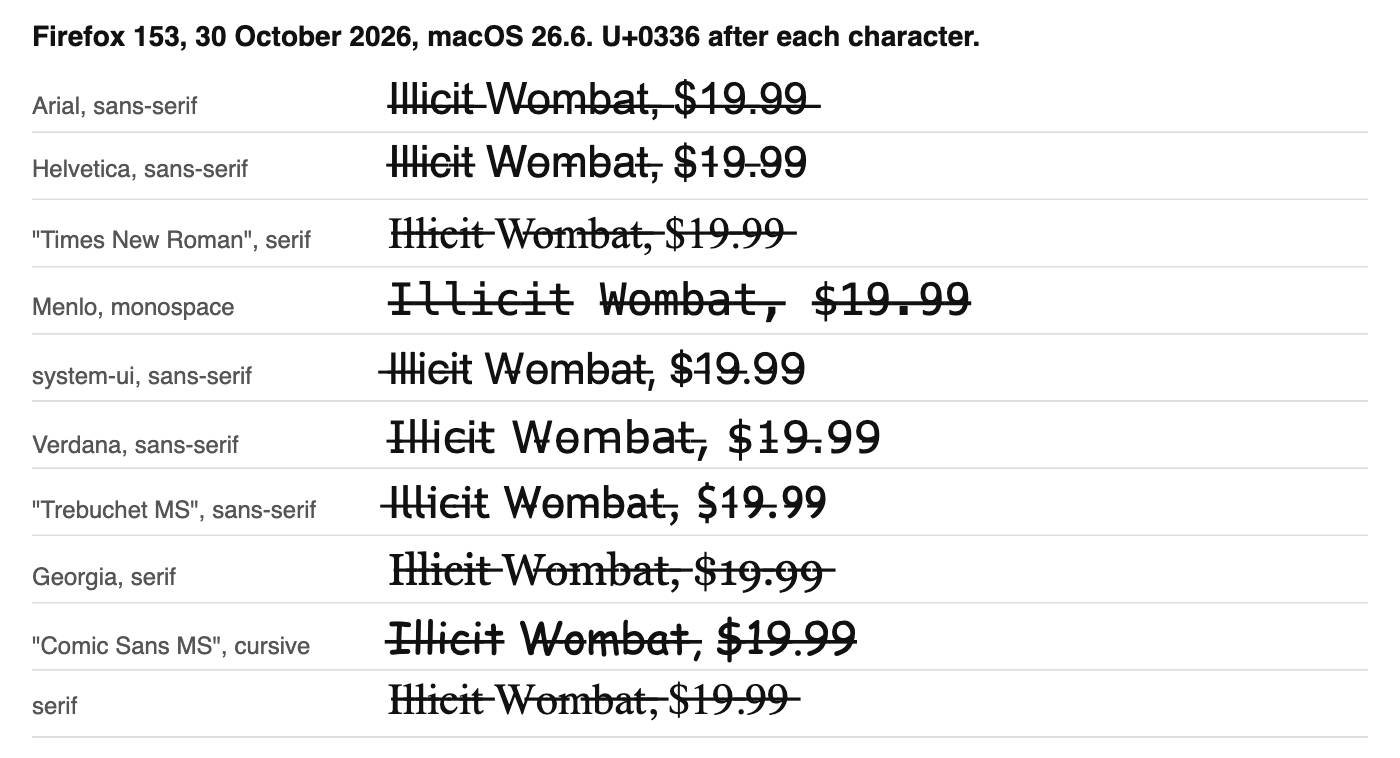
Firefox 153, 30 October 2026.
Small caps with a stroke also drew boxes in Chrome, so this page has no such style. See why fancy text shows as boxes.
Does strikethrough text hurt accessibility or search?
Strikethrough text hurts accessibility because the crossing out carries no meaning for software; its effect on search is unproven.
- Speech: the macOS say command made byte-identical audio for “Was $50, now $30” with and without a stroke on $50, so a listener hears the old price as current. We did not test VoiceOver, NVDA or JAWS.
- Find on page: a scripted browser find for “cancel” matched the struck word in all three engines. An exact string match did not.
- Search engines: we found no Google rule on these marks and cannot measure its index, so keep words you want found in plain text.
How do I remove strikethrough from text?
To remove strikethrough from text, paste it into the box above and copy the Remove Strikethrough style. It deletes only the marks U+0334 to U+0338, so accents survive. In Word, repeat Home > Strikethrough; in Markdown, delete the tildes.
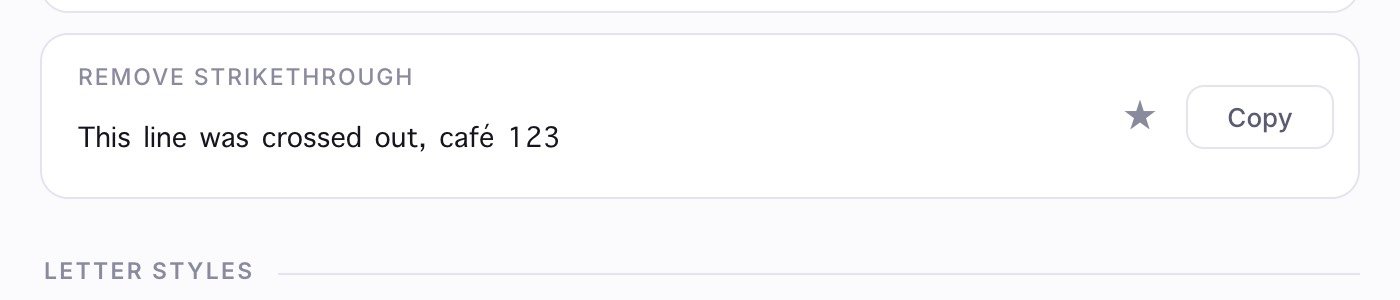
Remove Strikethrough in Chromium 151, 30 October 2026, after pasting struck text in. The sticky site header is hidden.
When should you not use strikethrough text?
Skip Unicode strikethrough when the text must be read aloud, found or retyped. It suits a joke, a sale post or one short bio line.
- Prices and deadlines: write “was $50” so everyone gets the meaning.
- Usernames, hashtags, links and code: a struck word is a different string.
- Apps with built-in formatting: those draw a cleaner line.
Other effects: the upside down text generator, the glitch text generator and every generator.
Frequently asked questions
Can I make double strikethrough text?
Not with Unicode, which has no double horizontal stroke overlay; two U+0336 marks drew one line in all three engines we tested. Microsoft Word has a real Double strikethrough option in its Font dialog.
Can I strike through only part of a word or line?
Yes. Type only that part into the box, copy it and paste it over the original letters.
Does strikethrough text work on Instagram and X (Twitter)?
We could not test either, because both need a login. Paste it into a draft and check it on a phone before posting.